

Home Assistant is actually not that difficult to understand – once you understand it 🙂
However, terms such as HA Core, HA OS, HA Supervised, HACS, add-ons and integrations confuse every Home Assistant beginner. That’s why I’d like to give you a brief overview of what these terms mean and how they differ. For the professionals among you: Some explanations are deliberately simplified so that even laypeople can understand them. My explanations are based on my many experiences from the many enquiries, comments and questions in the HA forum and on Reddit.
HA Core and HA OS
HA Core is the actual Home Assistant software. It can be installed on different operating systems. The Home Assistant Core is based on the popular Python programming language and if you have a Python interpreter on your computer, you can also run Home Assistant on it. This is even possible under Windows and is particularly easy using WSL (Windows Subsystem for Linux).
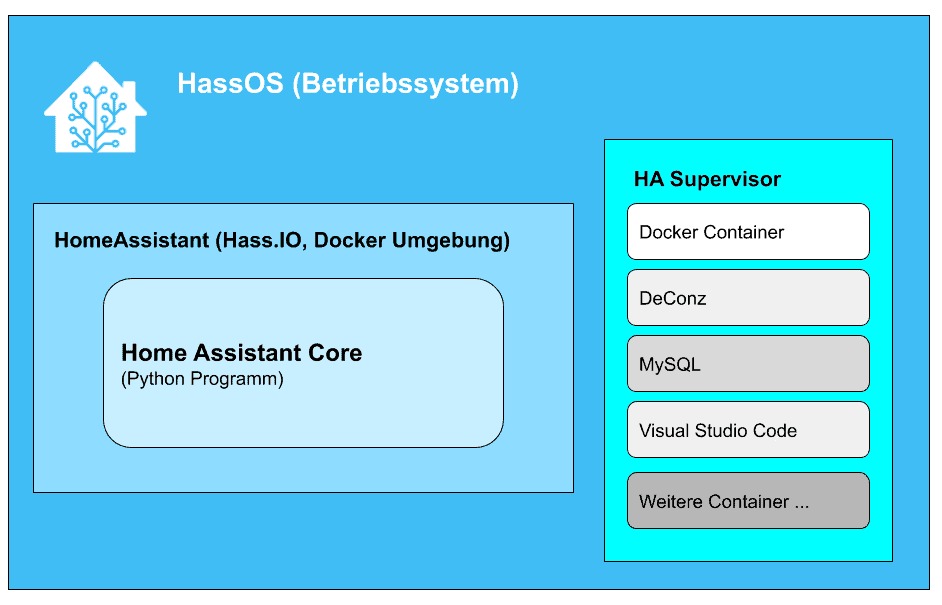
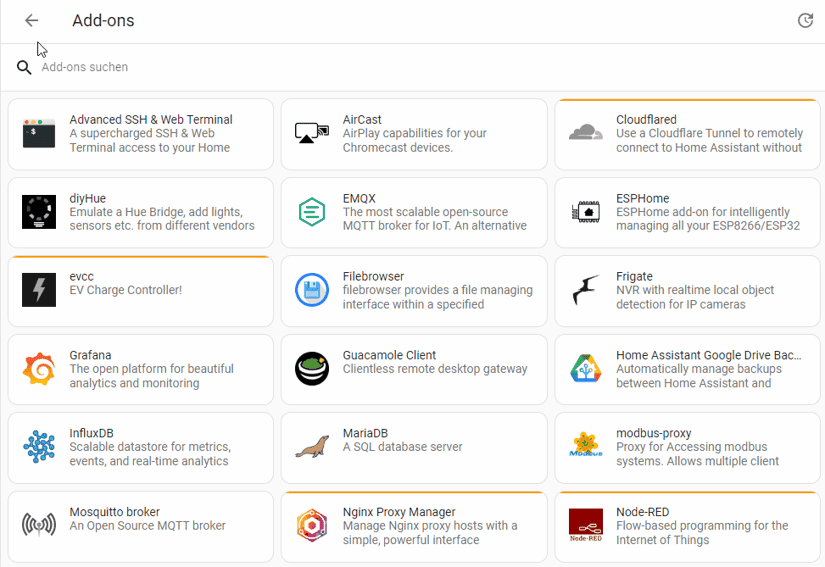
HAOS, on the other hand, is a Linux operating system specially customised for the operation of Home Assistant. This also includes the supervisor to be able to run add-ons. The supervisor is nothing more than a Docker environment and the add-ons are Docker containers that provide extensive additional applications. Popular add-ons include the Mosquitto MQTT server, Zigbee2MQTT, Frigate, ESPHome or Studio Code Server.
The Docker containers and add-ons can be thought of as small servers that provide certain complex applications, encapsulated from the actual operating system.
HAOS, and therefore Home Assistant Supervised, can be installed directly on the hardware, such as a Raspberry Pi or PC. However, it can also be installed as a virtual machine, e.g. in Proxmox, UnRaid, VirtualBox, a supported NAS system or via Hyper-V under Windows.
You do not have to use HA Supervised to be able to use add-ons. If you already have a Docker environment, you can just as easily install these add-ons there and make HA Core accessible. This can have advantages, but is also more complex and time-consuming.
These Docker container images, because that’s what the add-ons are, are also available outside of Home Assistant. The only difference is that you have to take care of the installation and configuration in your Docker environment yourself.
For many users, however, Supervised is the easier way to use add-ons (or Docker containers), as you have everything you need under one roof and don’t need to know anything about Docker.
Integrations vs. add-ons
Integrations are components within Home Assistant that establish communication with devices and services. They tend to be simpler interfaces, but they “talk” directly to the HA core. This distinguishes integrations from add-ons.
Add-ons are initially independent and encapsulated applications that can only communicate with the HA Core via the associated integration.
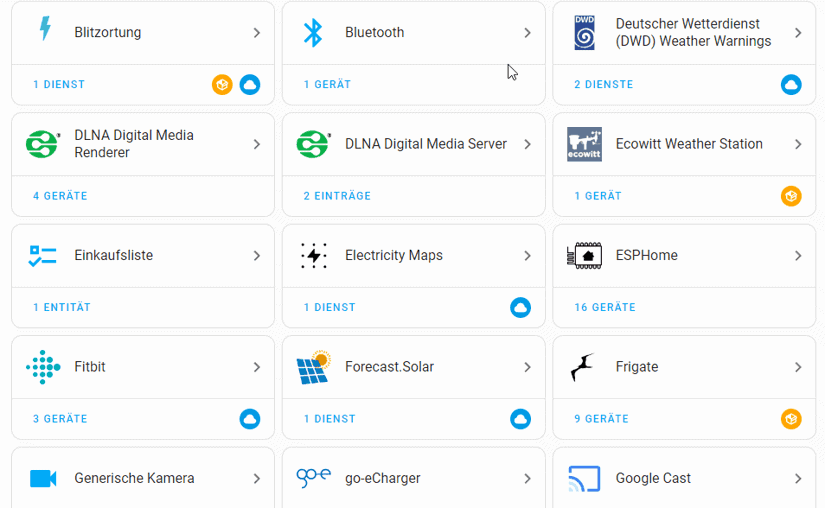
For example, if you want to connect Bluetooth devices and sensors to HA, there is a Bluetooth integration. With the corresponding integration, you tell it that you want to use it and how it works.
The same applies to Shelly devices, for example. These communicate via WLAN or Ethernet, which the HA Core also understands. With the Shelly integration, you tell the HA Core that you want to use these devices and the integration tells it how to communicate with these devices.
If you want a weather forecast in Home Assistant to control the garden watering, for example, the OpenWeatherMap integration establishes the connection to the weather service. This provides you with temperatures, rainfall, etc. as entities that can then be used for automation and much more.
Entities refer to a data unit (you could also call it an object) that contains a specific value or status. Examples of entities in Home Assistant include
- temperature_outside: 16 °C
temperature_outside is the name of the entity and 16 °C is its content. - light_living_room: 50%
- garage_door: closed
- switch_coffee_machine: off
Add-ons themselves do not provide any entities. Only their integration can make data from the add-ons available and usable as entities in Home Assistant.
HACS (Home Assistant Community Store)
Many developers use HACS to provide countless integrations, themes and Lovelace Cards that are not an official part of HA Core.
The Home Assistant Community Store, which also has to be activated first, contains many useful integrations, special cards for the front end and themes that can be used to customise the look of Home Assistant.
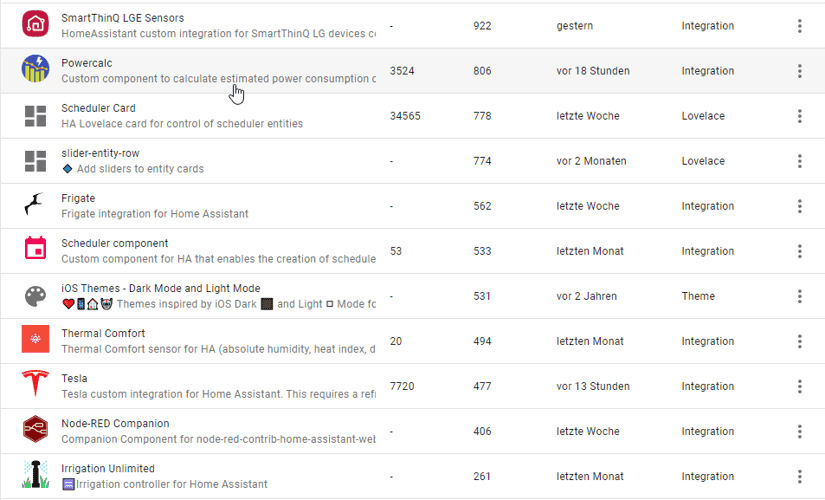
My Viessmann heating system is integrated via the ViCare integration from HACS, for example. The same applies to the connection of my Ecowitt weather station or the Govee LED strips.
However, this content is not part of the official development, is often less tested and can cause problems under certain circumstances, which often happens when a version of Home Assistant is changed. Also, a lot of content in the Home Assistant Community Store often depends on just one developer. If the developer no longer has the time or inclination (or even worse …), the integration or whatever it is is orphaned.
If Home Assistant doesn’t work as it should or makes strange errors, it’s often a good idea to first deactivate things that you have installed from HACS.
Conclusion
To get started with Home Assistant easily and successfully, you should first familiarise yourself with the terminology and what is behind it. This will then also help you to find the right platform for your own Home Assistant installation. More on this in the next article -> Which hardware should I choose for Home Assistant?


Leave a Reply